

Knowing whether your charger actually delivers what it claims, whether a battery holds its rated capacity, or whether your home power supply stays within safe operating limits requires measurement rather than assumption. A $50 USB-C charger advertised at 65W may deliver 48W under load. A battery pack rated at 20,000mAh may actually store 14,000mAh. A wall outlet in an older building may fluctuate between 210V and 235V in ways that affect sensitive electronics. Without the right measurement tools, these invisible problems cause device damage, battery degradation, and wasted money that is entirely preventable.
AliExpress in 2026 offers a strong range of power measurement and monitoring tools — from compact USB-C inline power meters through professional electronic load battery testers to smart plugs with real-time energy monitoring — at prices that make equipping a complete home lab practical. After testing these devices across USB-PD charger verification, battery capacity measurement, home energy monitoring, and panel voltage monitoring applications, we identified five products that deliver accurate, reliable measurement for their specific use cases.
Whether you are verifying charging cables, testing battery health, monitoring home energy consumption, or need a permanent voltage reference for a workshop, this guide covers the measurement tool that matches your application.

Quick Comparison: Top 5 USB Testers & Voltage Meters
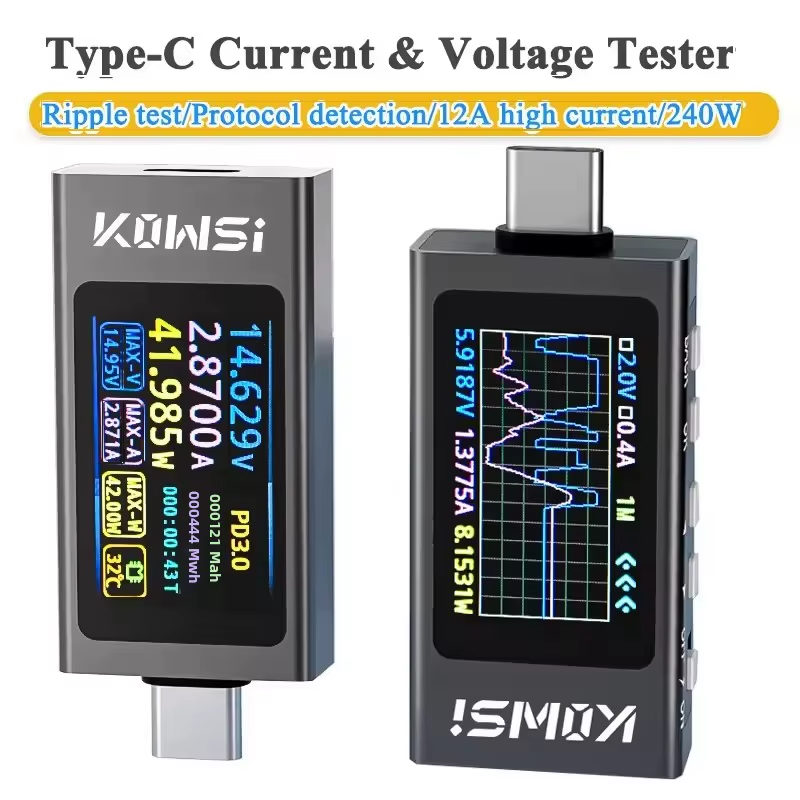
KWS-X1 USB Type-C Power Meter

DL24/P Electronic Load Battery Tester

150W 4-Wire Battery Capacity Tester

Tuya Wi-Fi Smart Plug with Energy Monitor
Detailed Specifications Comparison
| Specification | KWS-X1 | DL24/P | 150W 4-Wire Tester | Tuya Smart Plug | DM55-1 Voltmeter |
|---|---|---|---|---|---|
| Measurement Type | DC voltage, current, power | Charge/discharge load testing | Battery capacity discharge | AC power, energy, current | AC voltage monitoring |
| Voltage Range | DC 4–30V | DC variable | DC battery range | 85–265V AC | 80–300V AC |
| Current Range | 0–12A | Variable load | High-drain to 150W | Up to 16A | N/A — voltage only |
| Display | LCD | 2.4″ color LCD | 2.4″ color TFT | App dashboard (Wi-Fi) | Digital LCD |
| Connectivity | Inline USB-C | Bluetooth + app | Standalone | Wi-Fi + Tuya app | Wall outlet plug |
| Power Method | 4-wire — no drop error | Charge and discharge modes | 4-wire measurement | Permanent plug-in | Permanent wall-mount |
| Best For | Charger and cable testing | Battery performance analysis | High-capacity cell verification | Home energy monitoring | Workshop AC supply monitoring |
| Rating | 4.8/5 | 4.8/5 | 4.7/5 | 4.6/5 | 4.6/5 |
Detailed Reviews: Top 5 USB Testers & Voltage Meters
KWS-X1 USB Type-C Power Meter — Editor’s Choice
The KWS-X1 USB Type-C Power Meter earns our Editor’s Choice as the most versatile and immediately useful measurement tool for anyone who owns USB-C devices. The core question this meter answers — is my charger actually delivering what I expect? — is one that most USB-C device owners have encountered without having a reliable way to answer it. A USB-C cable that passes power at 5V/2A instead of negotiating 20V/3.25A for a 65W delivery; a power bank that claims 20,000mAh but drains suspiciously fast; a fast-charge adapter that loses its PD capability with certain cables — the KWS-X1 makes these invisible problems immediately visible.
The DC 4–30V and 0–12A measurement range covers every standard USB-C power delivery scenario from basic 5W legacy charging through 100W USB-PD 3.0 maximum delivery. The inline format — plugged between the charger and the device — measures real-time voltage, current, and calculated wattage simultaneously on the LCD display without interrupting charging operation. This real-time display during active charging is the practical capability that distinguishes the KWS-X1 from a one-time connection verification tool: you can watch how the charge parameters change as a device battery fills, observe PD negotiation at connection, and confirm exactly what power is flowing at any moment during the charging cycle.
The compact design that fits into any toolkit or bag means this meter travels alongside the equipment it monitors rather than sitting unused on a bench between sessions. For electronics repair technicians who test charging ports and cables as part of device diagnostics, the KWS-X1 provides the immediate measurement confirmation that visual inspection and multimeter probing cannot efficiently provide. The simplified interface compared to professional bench meters is the appropriate trade for a portable tool — fast, clear, relevant readings are what field verification requires, and the KWS-X1 delivers these consistently.
Key Specifications
- Voltage Range: DC 4–30V — covers all standard USB-C charging from 5V through 20V PD
- Current Range: 0–12A — sufficient for 100W+ USB-PD 3.0 maximum delivery monitoring
- Display: LCD — real-time simultaneous voltage, current, and calculated wattage
- Format: Inline USB-C — plugs between charger and device without interrupting charging
- Function: Full PD tester — displays negotiated power delivery parameters at connection
- Form Factor: Compact — fits in any toolkit or bag for portable field testing
Best Use Cases
- Verifying USB-C charger output against advertised wattage during active device charging
- USB-C cable quality testing — confirming PD negotiation and detecting resistance-limited cables
- Power bank capacity verification by monitoring total energy delivered during a discharge cycle
- Electronics repair diagnosis of USB-C charging port functionality and PD negotiation behavior
- Comparing multiple chargers or cables to identify which combination delivers best performance
- Any user who has ever wondered whether their charger is actually delivering advertised power
DL24/P Electronic Load Battery Tester — Best Battery Tester
The DL24/P Electronic Load Battery Tester earns the Best Battery Tester position as the most complete battery analysis tool in this comparison. An electronic load tester applies a controlled discharge current to a battery and measures the voltage at each point in the discharge curve — the resulting data tells you not just the battery’s capacity, but the quality of that capacity: how voltage sags under load, how quickly the cell reaches its cutoff voltage, and whether the internal resistance is within the specification expected for a healthy cell. These measurements are the difference between knowing a battery’s rated capacity and knowing its actual health.
The 2.4″ color LCD display provides a large enough screen area to visualize the discharge curve in real time — watching voltage drop against accumulated mAh as the test progresses is the diagnostic picture that raw numbers alone cannot replace. The Bluetooth app integration extends this data view to a smartphone or tablet screen for remote monitoring during discharge tests that can take hours — allowing the test to proceed unattended while the data logs in the app for later analysis. The seamless connectivity transforms a bench test session into a professional data-logging operation without requiring a dedicated computer or expensive software.
Charge and discharge mode availability in a single unit makes the DL24/P useful beyond battery capacity testing: it can verify charger output under simulated load conditions, test power banks to confirm rated capacity through a complete discharge cycle, and monitor charging behavior of cells to identify whether they charge to proper voltage and hold it. The Bluetooth requirement for app features means the unit is fully functional from its own display without connectivity, with the app providing the additional data logging and remote visualization that transforms occasional testing into systematic battery health tracking.
Key Specifications
- Display: 2.4″ color LCD — discharge curve visualization in real time
- Connectivity: Bluetooth + smartphone app — remote monitoring and data logging
- Modes: Charge and discharge — covers both battery testing and charger output verification
- Data Output: App logging — full discharge curve recorded for analysis and trend tracking
- Standalone Operation: Fully functional from onboard display without Bluetooth connection
- Best Application: Battery health assessment, power bank capacity verification, charger load testing
Best Use Cases
- Battery capacity verification — confirming that cells hold claimed capacity under controlled discharge
- Battery health assessment through internal resistance estimation from discharge curve analysis
- Power bank testing — verifying total delivered capacity through a complete discharge cycle
- Charger output verification under load — confirming voltage stability as current demand increases
- Long-duration unattended tests with Bluetooth app monitoring and data logging to smartphone
- Hobbyists and makers who manage battery collections and need systematic health tracking over time
150W 4-Wire Battery Capacity Tester — Best Capacity Tester
The 150W 4-Wire Battery Capacity Tester earns the Best Capacity Tester position for its combination of high power handling, professional 4-wire Kelvin measurement, and desktop-friendly form factor that brings lab-quality battery testing to a home bench at an accessible price. The 4-wire method is the key specification that separates this tester from 2-wire alternatives — by using separate wire pairs for current sourcing and voltage sensing, it eliminates the voltage drop across the test leads from the measurement. In battery capacity testing, this matters because the resistance of even quality test leads at high discharge currents creates a measurable voltage error that 2-wire instruments record as lower battery voltage than the cell is actually delivering — leading to premature cutoff and an underestimate of true capacity.
The 150W power handling capacity addresses the limitation that constrains simpler battery testers when measuring high-drain cells. A 3S lithium pack at 12.6V fully charged requires 11.9A of discharge current to run a 150W load test — a test that would exceed the capability of testers designed for single-cell or low-power applications. For anyone testing laptop battery packs, large power bank internals, RC vehicle battery systems, or any multi-cell configuration, this headroom is not academic but operationally necessary. The 2.4″ color TFT display provides the discharge curve visualization at a screen size appropriate for reading from normal bench working distance without needing to lean in to read data.
The CNC electronic load designation indicates a digitally controlled load rather than a manually adjusted resistive load — meaning the discharge current is set numerically and maintained consistently throughout the test regardless of battery voltage changes. A consistent discharge current produces comparable results across tests, which is essential for meaningful capacity comparison between cells or between test sessions on the same cell over time. The audible cooling fan during high-load tests is the practical trade-off for a 150W rating in a compact desktop enclosure — expected and appropriate for the power level being handled.
Key Specifications
- Measurement Method: 4-wire Kelvin — eliminates test lead voltage drop from capacity measurement
- Power Handling: 150W — sufficient for multi-cell lithium packs and high-drain battery systems
- Display: 2.4″ color TFT — discharge curve visualization at readable bench working distance
- Load Type: CNC electronic load — digitally controlled constant current for test repeatability
- Cooling: Active fan — audible at high load, necessary for 150W thermal management
- Power Connection: EU plug included — ready to use on standard workshop outlet
Best Use Cases
- Laptop battery pack capacity testing under realistic high-current discharge conditions
- Multi-cell RC vehicle battery system health verification and capacity confirmation
- High-capacity power bank internal cell testing exceeding the capability of 2-wire alternatives
- Systematic battery collection health tracking where CNC constant current ensures comparable results
- Any battery testing application where 4-wire accuracy matters for reliable capacity figures
- Hobbyists and makers who need lab-quality battery capacity data without lab-grade instrumentation cost
Tuya Wi-Fi Smart Plug with Energy Monitor — Best Smart Monitor
The Tuya Wi-Fi Smart Plug with Energy Monitor earns the Best Smart Monitor position as the most practical tool in this comparison for ongoing home energy awareness and connected device management. Where the other tools in this guide are active measurement instruments used when you deliberately run a test, the Tuya smart plug is a passive continuous monitor — it sits in the wall outlet, records everything connected to it, and makes that data available in the Tuya app at any time. The power consumption of your desktop computer over a work week, the standby draw of your entertainment system overnight, the energy cost of a high-wattage appliance run for a month — all of this accumulates automatically without any active testing session.
The 16A and 85–265V AC capability covers the full range of standard household and workshop appliances across all major electrical standards — from 100V Japanese single-phase through 240V UK and European supplies. This range means the smart plug works correctly anywhere, and the 16A current rating handles all standard appliances including washing machines, dishwashers, and workshop tools up to approximately 3,500W on a 220V supply. The Tuya app ecosystem provides the monitoring dashboard, energy history, scheduling, and smart home integration that transforms a simple plug into a managed energy node — compatible with Alexa, Google Home, and other major platforms for voice control and automation integration.
The 2.4GHz Wi-Fi requirement is the practical limitation to note before purchasing — this plug requires a 2.4GHz Wi-Fi network and does not support 5GHz-only networks. Most home routers broadcast both bands, but mesh networks that combine them on a single SSID can sometimes cause registration issues. Ensuring the plug registers on the 2.4GHz band during initial setup resolves this in most cases. The energy monitoring capability does not work for high-voltage industrial equipment — this is a home and workshop appliance monitor, not an industrial power measurement tool.
Key Specifications
- Voltage Range: 85–265V AC — covers all major household electrical standards worldwide
- Current Rating: 16A — handles standard household and workshop appliances up to ~3,500W
- Connectivity: 2.4GHz Wi-Fi — Tuya app for monitoring, control, and smart home integration
- Monitoring Type: Passive continuous — energy accumulates automatically without active sessions
- Smart Home: Compatible with Alexa, Google Home, and Tuya ecosystem integrations
- Limitation: 2.4GHz Wi-Fi required — 5GHz-only networks not supported
Best Use Cases
- Monitoring electricity consumption of specific appliances over days, weeks, and months
- Identifying high-standby-draw devices that contribute unexpectedly to electricity bills
- Workshop power monitoring for equipment that runs intermittently over long sessions
- Smart home automation where outlet control and energy monitoring integrate with existing platforms
- Comparing energy consumption between older and newer appliances when making replacement decisions
- Anyone who wants to understand and reduce household electricity consumption with zero active effort
DM55-1 Digital Panel Voltmeter — Permanent AC Monitoring

The DM55-1 Digital Panel Voltmeter occupies a distinct niche among the tools in this comparison: it is a permanent installation instrument rather than an active testing device. Plugged into a wall outlet, it continuously displays the AC supply voltage on its digital LCD screen — providing an always-visible reference for the electrical supply quality that all other connected equipment depends on. Power supply voltage fluctuations are invisible to users who have no monitoring in place — a workshop with voltage regularly dropping to 195V under load, or fluctuating between 210V and 245V during the day, creates equipment stress and performance variability that appears as unexplained problems rather than an identifiable electrical supply issue.
The 80–300V AC measurement range covers single-phase supplies across all standard household voltages worldwide — 100V Japanese, 110V North American, 220V European and Asian, and 240V UK and Australian supplies all fall within range. The ±1.5% accuracy specification is sufficient for practical supply quality assessment — the difference between a healthy 230V supply and a problematic 205V supply is immediately visible and far exceeds the 1.5% error band. The digital LCD is designed for readability at normal room viewing distances, allowing at-a-glance voltage confirmation without approaching the outlet to read the display.
The plug-and-play wall outlet installation requires no tools, no wiring, and no configuration — plug it in and it reads immediately. Available in EU and US plug formats to match local power standards. The purely functional industrial-appearance housing is the honest trade for an instrument at this price: it monitors supply voltage accurately and continuously, which is exactly what it is designed to do. Limitations are equally clear: AC voltage monitoring only — it does not measure current, wattage, or energy consumption, and it does not connect to any app or logging system. For users who need those capabilities, the Tuya smart plug covers energy monitoring; the DM55-1 covers the permanent, no-configuration, always-visible voltage reference role that the smart plug does not fill.
Key Specifications
- Voltage Range: 80–300V AC — covers all standard single-phase household supplies worldwide
- Accuracy: ±1.5% — sufficient for practical supply quality assessment and anomaly identification
- Display: Digital LCD — readable at room viewing distance without approaching the outlet
- Installation: Plug-and-play wall outlet — no tools, wiring, or configuration required
- Plug Format: Available in EU and US versions — matches local power standard
- Limitation: AC voltage only — no current, wattage, energy, or app connectivity
Best Use Cases
- Workshop permanent voltage reference — always-visible supply quality confirmation for sensitive equipment
- Home office supply monitoring where voltage fluctuations affect computer and peripheral performance
- Older buildings where supply voltage quality is uncertain and equipment protection depends on knowing
- Locations with known grid instability where real-time voltage visibility informs equipment protection decisions
- Electronics repair bench supply monitoring where soldering station and hot air station performance depends on supply quality
- Any user who wants a permanent, no-maintenance, no-configuration AC voltage reference visible at all times
Buying Guide: Power Measurement Tools in 2026
Choosing the right power measurement tool depends on identifying what question you need answered — active testing, passive monitoring, or permanent reference — and then matching the tool’s capability to that specific requirement.
Understanding USB Power Delivery Standards
Modern USB-C charging involves a negotiation between the charger and device that determines the actual delivered voltage and current — a process called USB Power Delivery. When a USB-PD charger and device connect, they exchange capability information and agree on the highest common power level. A USB-PD 3.0 charger supporting 20V/3.25A (65W) connected to a device that only requests 5V/3A will deliver 15W, not 65W — and this negotiation result is exactly what the KWS-X1 inline meter displays. Understanding that the advertised charger wattage is a maximum capability rather than a guaranteed delivery helps interpret meter readings: a 65W charger delivering 25W to a phone is likely correct behavior, not a charger fault. The meter shows you the truth of what is happening, and understanding PD negotiation allows you to correctly interpret what that truth means.
Battery Capacity Testing — Safety First
Battery discharge testing requires specific safety practices regardless of the sophistication of the test equipment. Always start with low discharge currents when setting up a new battery on the tester — verify that the connections are correct, the battery voltage is within expected range, and the setup is thermally stable before increasing to the target test current. Monitor temperature continuously during high-current discharge — a battery that is heating rapidly is experiencing a problem that increases safety risk and invalidates capacity measurements. If temperature rises quickly, stop the test immediately and allow the cell to cool before investigating the cause. Never leave a high-current discharge test completely unattended, particularly with older or previously damaged cells where internal resistance can create unexpected thermal events. The 150W capacity tester and DL24/P both have thermal protection circuits, but these protect the instrument — cell safety depends on the operator monitoring the test appropriately.
Getting the Most from Your Measurement Tools
Data logging and trend analysis transform single-point measurements into meaningful diagnostic information. A charger that measures 62W today and 54W in three months and 48W in six months tells the story of gradual degradation that a single measurement cannot. The DL24/P’s Bluetooth app logging capability supports this systematic approach — keeping records of battery capacity tests over time identifies the rate of capacity fade that determines when replacement is warranted. Clean contact points on all measurement connections are the maintenance practice that prevents resistance buildup from distorting readings — oxidized contacts on USB-C connectors or battery test leads add resistance that registers as lower voltage under load, leading to incorrect conclusions. Clean terminals with contact cleaner periodically and before important measurements. Firmware updates on intelligent devices like the DL24/P and Tuya smart plug incorporate accuracy improvements and protocol support additions — check for updates when new USB charging standards or smart home protocols become relevant to your use case.
“Data is only as valuable as the accuracy of the tools used to collect it. Documenting your findings allows you to see the story behind the numbers.”
Our Final Recommendations
The KWS-X1 USB-C Power Meter is the first purchase recommendation for any electronics enthusiast with USB-C devices — it answers the most commonly encountered power measurement question (is this charger working correctly?) immediately and portably at a cost that makes it an obvious toolkit addition. For anyone managing a battery collection or wanting to verify power bank and battery pack health, the DL24/P Electronic Load Tester provides the charge/discharge analysis and Bluetooth data logging that makes battery management systematic rather than approximate.
The 150W 4-Wire Capacity Tester is the upgrade for users whose batteries exceed the DL24/P’s power handling or who require the 4-wire measurement accuracy that eliminates test lead errors from high-current capacity figures. The Tuya Smart Plug brings passive continuous energy monitoring to any household appliance with zero ongoing effort — set it up once and the data accumulates. The DM55-1 Voltmeter provides the simplest and most reliable permanent AC supply reference for any workshop or office where knowing the wall voltage at a glance matters. Together, these five tools cover the complete range of power measurement needs from portable USB diagnostics through permanent supply monitoring.
![Best budget multimeters and test accessories from AliExpress [year] on a workbench](https://bestfindo.com/wp-content/uploads/2026/04/best-budget-multimeters-from-aliexpress-2026.jpeg)